
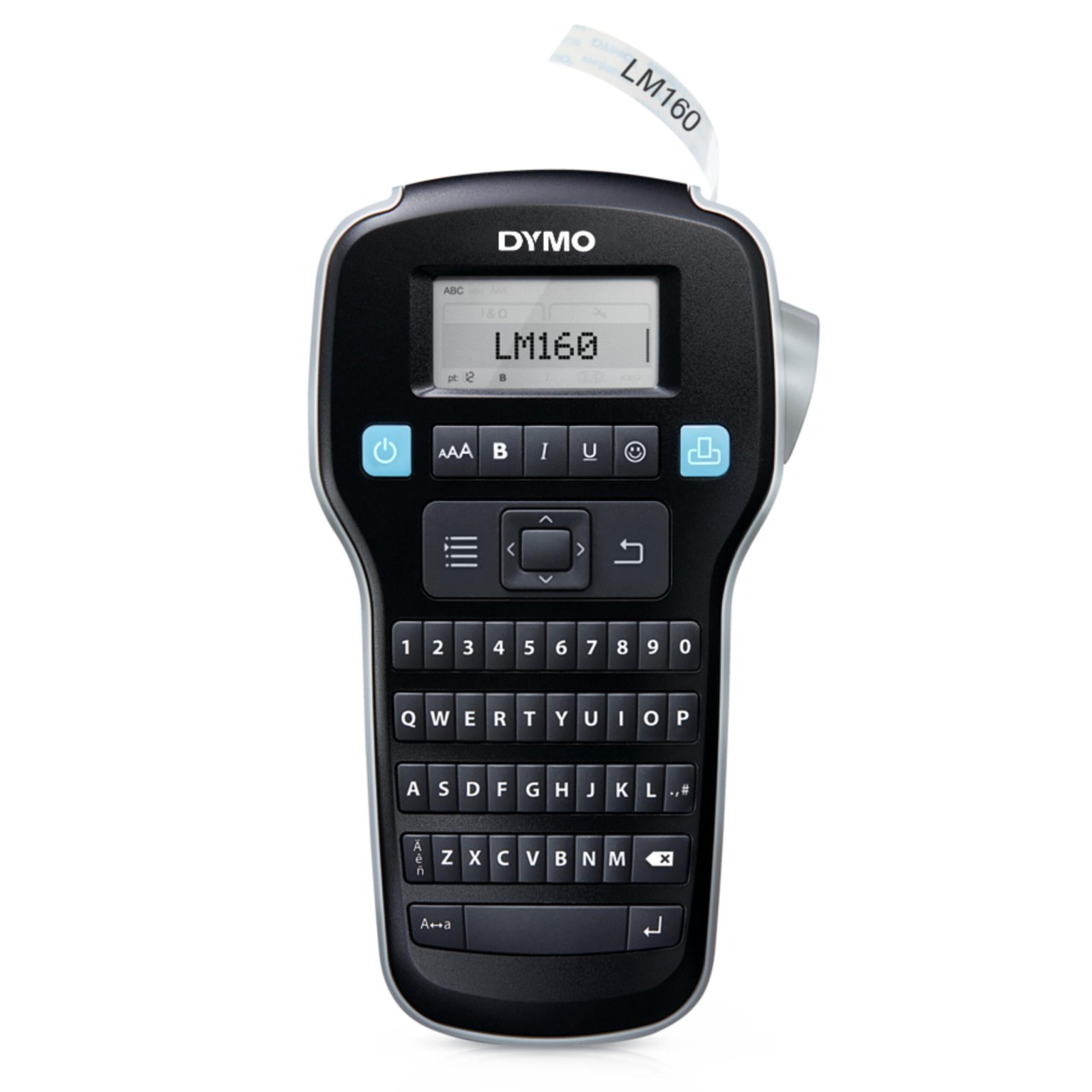

DYMO LM160 Labelling Machine – Portable QWERTY Handheld Label Maker
The DYMO LM160 Labelling Machine (Label Manager 160) is a fast, easy-to-use handheld label maker designed to bring professional organization to any office, workspace, or home. Engineered by DYMO, a world leader in organizational technology, this lightweight device allows users to create custom labels in seconds without needing a computer connection.
Featuring a familiar, computer-style QWERTY keyboard layout, the DYMO LM160 Labelling Machine simplifies text entry, making typing as fast and natural as sending a text message. It utilizes direct thermal transfer technology, which prints crisp text by applying heat directly to the label tape. This means you will never have to buy expensive ink cartridges or toner. With its portable, ergonomic body and large graphical display, the DYMO LM160 Labelling Machine is the ultimate tool to tame clutter and label your world.
Key Features of the DYMO LM160 Labelling Machine
-
Intuitive QWERTY Keyboard: Type text quickly and comfortably with a computer-style keyboard layout, complete with a dedicated number row.
-
One-Touch Smart Formatting Keys: Instantly edit your labels with fast-access buttons for text size, bolding, italics, underlining, vertical orientation, and symbols.
-
Large Graphical Print Preview Screen: The easy-to-read LCD display shows exactly how your label will look before you print, preventing wasted labels and saving tape.
-
Extensive Customization Options: Choose from 6 font sizes, 8 text styles, 4 box designs, and over 228 symbols and clip-art images to make your labels stand out.
-
Versatile Tape Compatibility: Prints on durable DYMO D1 label tapes in 1/4″ (6 mm), 3/8″ (9 mm), and 1/2″ (12 mm) widths to suit any size container, folder, or cable.
-
Auto-Power Off: Built-in smart power management turns the machine off automatically during inactivity, extending the lifespan of your batteries.
Applications and Usage of the DYMO LM160 Labelling Machine
The high portability, cost-effective printing, and customizable layout of the DYMO LM160 Labelling Machine make it an essential asset for a variety of organizing needs:
-
Office and File Management: Create clear, standardized labels for hanging folders, binders, document storage boxes, and desk organizers to optimize daily workflows.
-
Asset and Inventory Tracking: Easily mark company property, such as laptops, keyboards, tools, and storage bins, for quick identification and asset tracking.
-
Home and Kitchen Organization: Label pantry canisters, spice jars, storage totes, toy bins, and laundry room shelves to maintain an orderly household.
-
Cable and Wire Identification: Wrap flexible nylon labels around power strips, HDMI cords, and server cables to make tracing connections easy.
Technical Specifications
| Parameter Specification | Technical Details & Device Ratings |
| Product Component Class | Handheld Direct Thermal Label Maker |
| Primary Target Keyword | DYMO LM160 Labelling Machine |
| Keyboard Layout | QWERTY Style with Dedicated Number Pad |
| Label Tape Compatibility | DYMO D1 Standard & Flexible Nylon Tapes |
| Supported Tape Widths | 6 mm, 9 mm, and 12 mm (1/4″, 3/8″, 1/2″) |
| Print Resolution | 180 DPI (Dots Per Inch) |
| Print Technology | Direct Thermal Transfer (Ink-Free) |
| Formatting Customization | 6 Font Sizes, 8 Text Styles, 228 Symbols |
| Power Source | 6 x AAA Alkaline Batteries or Optional AC Power Adapter |
| Display Screen | Monochrome Graphical LCD with Print Preview |
| Cutter System | Manual side-mounted blade |
Benefits of the DYMO LM160 Labelling Machine
-
No Ink or Toner Required: The heat-activated thermal printing system saves on recurring supply costs.
-
Highly Portable and Travel-Ready: Its compact, lightweight design easily fits into a drawer or backpack, letting you label items anywhere on the go.
-
Durable, Weather-Resistant Labels: Compatible DYMO D1 labels are water-resistant, UV-resistant, and can withstand temperature extremes, ensuring your labels remain legible over time.
Operation and Setup Guidelines
Note: To ensure optimal print quality, always use genuine DYMO D1 label cassettes. Standard generic tapes may jam the feed mechanism or cause faded printouts.
Load the Batteries and Tape: Open the rear cover of the labelling machine. Insert 6 AAA batteries matching the polarity symbols, then drop in your D1 label cassette. Ensure the tape is positioned correctly between the guide rollers and click the door shut.
Type and Style Your Label: Turn on the power. Use the QWERTY keys to type out your text. Press the “AAA” key to change font sizes, or select the bold/italic buttons to customize your text style.
Print and Cut: Review the layout on the graphical preview screen. Once satisfied, press the blue print button. Once printing stops, press the manual cutter button on the upper-right side of the device to cleanly release your finished label.
To review official tape compatibility matrices, device manuals, and complete firmware support sheets, check the global DYMO Brand Labeling and Office Solutions Support Directory.
To request a fast commercial quote or evaluate real-time regional warehouse stock availability for bulk procurement needs, please connect with our sales branch via the Control Qatar Contact Page.