
LS1005G DESKTOP SWITCH TP-LINK
LS1005G DESKTOP SWITCH TP-LINK – 5-Port Gigabit Unmanaged Network Switch
The LS1005G DESKTOP SWITCH TP-LINK (part of TP-Link’s LiteWave Series) is an unmanaged 5-port Gigabit desktop switch designed for expanding wired home and small office networks. Built with five auto-negotiation 10/100/1000 Mbps RJ45 ports, this compact switch delivers high-speed Gigabit connectivity to bandwidth-intensive devices such as computers, IP cameras, game consoles, and smart TVs.
Featuring a true plug-and-play architecture, the LS1005G DESKTOP SWITCH TP-LINK requires zero software configuration or setup. Each port supports Auto-MDI/MDIX, eliminating the need for crossover cables. Designed with energy-efficient Green Ethernet technology, the switch dynamically adjusts power consumption according to link status and cable length to minimize energy usage.
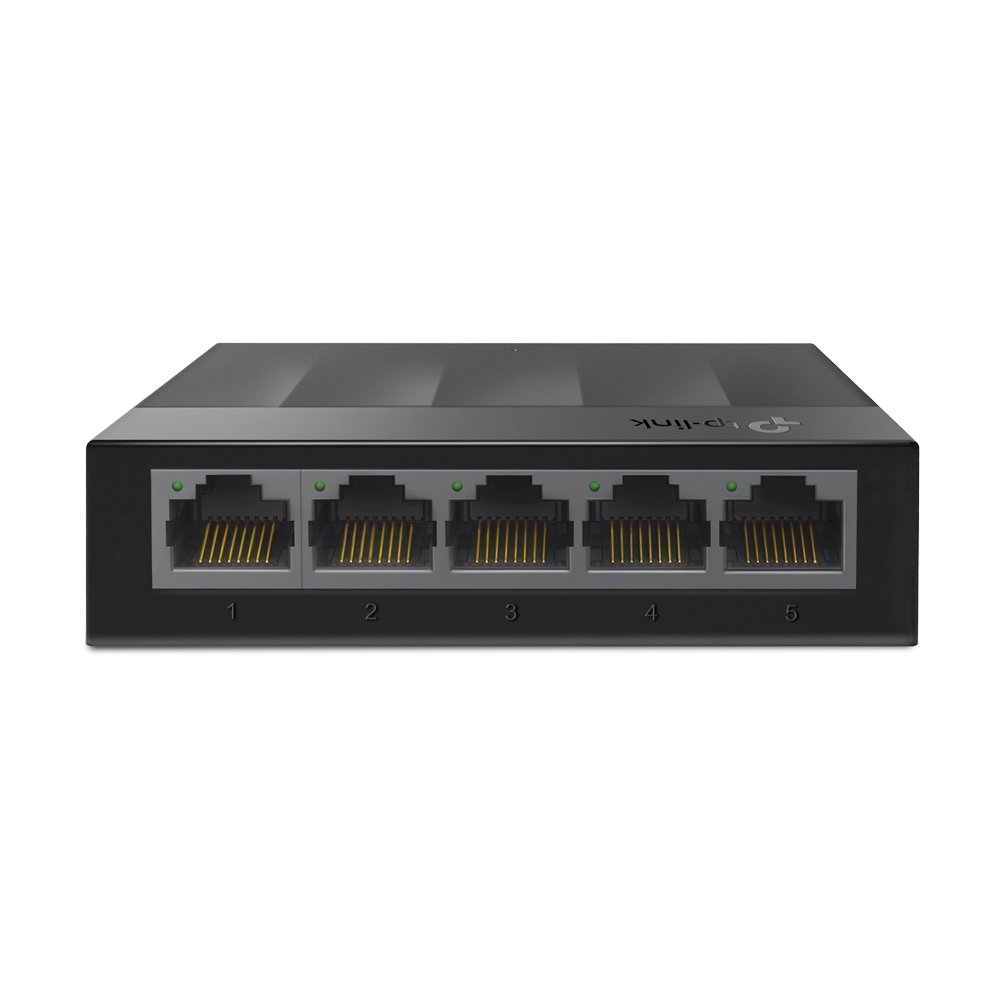
As shown in the product image, the switch features a matte black plastic casing with five numbered front-facing RJ45 Ethernet ports, each fitted with individual green LED status indicators, alongside a subtle TP-Link logo printed on the top surface.
Key Features of the LS1005G DESKTOP SWITCH TP-LINK
-
5 Gigabit RJ45 Ports: Equipped with 5 x 10/100/1000 Mbps Auto-Negotiation ports that provide instant transferring of large files without bottlenecking.
-
Plug and Play Operation: Requires no software installation or manual configuration; simply connect power and Ethernet cables to start using.
-
Auto-MDI/MDIX Support: Automatically detects cable types, removing the need for dedicated crossover Ethernet cables.
-
Green Ethernet Technology: Reduces power consumption by automatically scaling power draw based on cable length and connection activity.
-
Fanless Silent Design: Constructed without internal fans to ensure silent operation in quiet office and home desktop settings.
-
Compact & Wall-Mountable Housing: Lightweight plastic enclosure designed for versatile placement on desks or mounted onto walls.
-
IEEE 802.3x Flow Control: Provides reliable data transfer management and prevents packet loss during heavy network traffic bursts.
Common Applications and Network Usage
The reliability and simple setup of the LS1005G DESKTOP SWITCH TP-LINK make it a practical choice for expanding local area networks (LAN) across various environments:
-
Home Entertainment Systems: Connects smart TVs, streaming boxes, gaming consoles, and network storage (NAS) drives to a single high-speed router connection.
-
Small Office & Work-from-Home Setup: Expands available Ethernet ports for desktop PCs, network printers, VoIP phones, and laptops.
-
IP Video Surveillance: Links multiple IP security cameras to a local NVR or router without network lag.
-
Dormitories & Study Spaces: Provides reliable multi-device wired internet access in shared student housing or classrooms.
Technical Specifications
The core hardware and performance specifications for the LS1005G DESKTOP SWITCH TP-LINK are detailed below:
| Parameter Specification | Technical Details & Operational Values |
| Component Classification | 5-Port Gigabit Unmanaged Desktop Switch |
| Primary Target Keyword | LS1005G DESKTOP SWITCH TP-LINK |
| Manufacturer / Line | TP-Link / LiteWave Series |
| Model Number | LS1005G |
| Ethernet Interfaces | 5 x 10/100/1000 Mbps Auto-Negotiation RJ45 Ports |
| Network Standards | IEEE 802.3i, 802.3u, 802.3ab, 802.3x |
| Switching Capacity | 10 Gbps |
| Packet Forwarding Rate | 7.4 Mpps |
| MAC Address Table | 2K |
| Packet Buffer Memory | 1.5 Mb |
| Jumbo Frame Size | 16 KB |
| Transfer Method | Store and Forward |
| Power Supply | External Power Adapter (5V DC / 0.6 A) |
| Max Power Consumption | 3.7 W |
| Enclosure Material | Durable Plastic Casing (Fanless) |
| Dimensions (W x D x H) | 90 mm x 72 mm x 23 mm (3.5 x 2.8 x 0.9 in) |
| Certifications | CE, FCC, RoHS |
Installation Guidelines and Best Practices
QUICK SETUP TIP: Connect the power adapter to the rear DC port first, then use standard Cat5e or Cat6 Ethernet cables to link your devices.
Cable Recommendation: Use Category 5e (Cat5e) or Category 6 (Cat6) cabling to achieve full 1000 Mbps (Gigabit) speeds across all connected ports.
Placement & Ventilation: Place the switch on a clean flat surface or mount it vertically using the integrated bottom mounting slots. Ensure side airflow space is clear for heat dissipation.
To review official international standards for Ethernet physical layer protocols and data transmission specifications, consult the official IEEE 802.3 Ethernet Working Group Directory.
To evaluate real-time regional warehouse stock availability or request commercial quotes for bulk procurement needs, please connect with our sales branch via the Control Qatar Contact Page.