
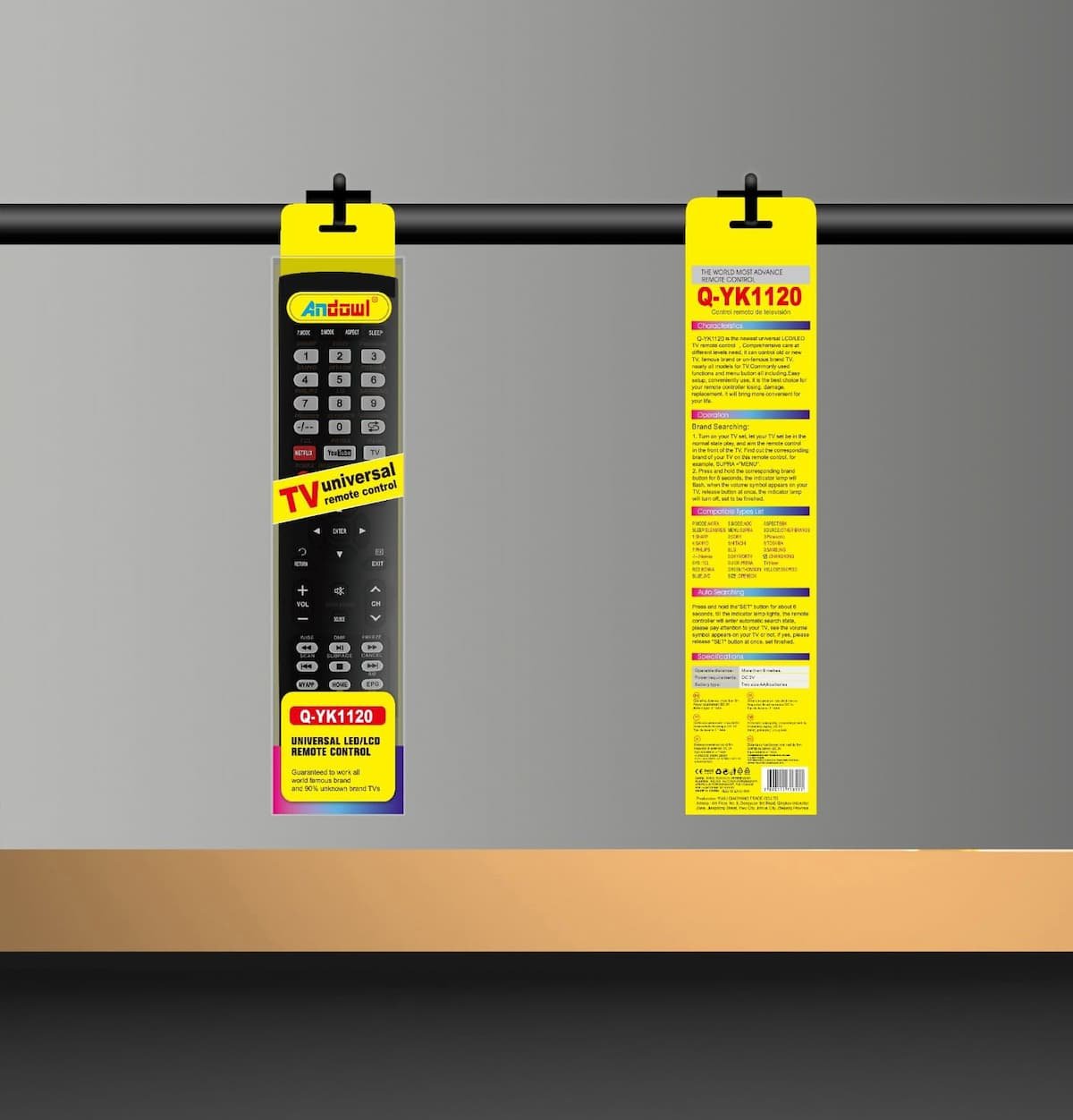

Q-YK1120 TV REMOTE ANDOWL
Q-YK1120 TV REMOTE ANDOWL – Universal Replacement Remote for LED & LCD TVs
The Q-YK1120 TV REMOTE ANDOWL (Model Q-YK1120) is a multi-brand universal television remote control designed to seamlessly replace lost, broken, or malfunctioning television remotes. Engineered by Andowl, this replacement controller features broad compatibility across global television brands, supporting both modern Smart LED/LCD TVs and legacy flat-panel display models.
With built-in automatic search algorithms and quick brand-pairing key shortcuts, setting up the Q-YK1120 TV REMOTE ANDOWL is straightforward. It integrates essential streaming hotkeys (such as dedicated Netflix, YouTube, and TV input buttons) along with full menu navigation, channel switching, volume control, and media playback functions—delivering a plug-and-play solution without requiring complex programming routines.
As shown in the product retail packaging, the remote features an elongated matte-black ergonomic body with soft-touch rubber buttons, clear directional pad layout, and prominently marked banner packaging indicating “Q-YK1120 UNIVERSAL LED/LCD REMOTE CONTROL” and “TV universal remote control”.
Key Features of the Q-YK1120 TV REMOTE ANDOWL
-
Universal Brand Compatibility: Engineered to control a wide range of world-famous television brands (e.g., Sharp, Sony, Panasonic, Philips, LG, Samsung) and generic unbranded LED/LCD TVs.
-
One-Touch Streaming Hotkeys: Features direct dedicated shortcut keys for quick access to popular streaming platforms and media inputs including Netflix, YouTube, and TV source selection.
-
Simple Brand Searching & Auto-Sync: Offers two quick setup modes—Direct Brand Key Searching and Auto-Search mode—for effortless pairing with your television set within seconds.
-
Comprehensive Keypad Layout: Includes a complete numeric pad, volume and channel rockers, directional arrows, exit/home navigation, and multimedia playback controls.
-
Long Transmission Range: Emits a powerful infrared (IR) signal capable of controlling your TV from distances over 8 meters (26 feet).
-
Ergonomic Lightweight Design: Slim profile with tactile rubber buttons provides a comfortable, slip-resistant grip during daily home entertainment viewing.
Common Applications and Practical Usage
The universal code library and easy configuration of the Q-YK1120 TV REMOTE ANDOWL make it an ideal replacement choice for various home and commercial environments:
-
Home Entertainment Replacement: Replaces lost, broken, or worn-out factory remotes for living room, bedroom, or basement televisions.
-
Hotels, Guest Houses & Rentals: Serves as a standard, easy-to-program replacement controller across multi-room hospitality properties.
-
Office & Classroom Displays: Manages presentation monitors, lobby information displays, and boardroom televisions without needing original manufacturer remotes.
-
Secondary / Backup Controller: Keeps a reliable backup remote on hand to avoid interruptions when original controllers fail or battery compartments wear out.
Technical Specifications
The primary operational, physical, and electrical properties for the Q-YK1120 TV REMOTE ANDOWL are detailed below:
| Parameter Specification | Technical Details & Operational Values |
| Component Classification | Universal IR Remote Control for LED/LCD TVs |
| Primary Target Keyword | Q-YK1120 TV REMOTE ANDOWL |
| Brand / Model Designation | Andowl / Q-YK1120 |
| Operable Distance | More than 8 Meters (Approx. 26 Feet) |
| Power Requirements | 3V DC (2 x AAA Batteries – Not Included) |
| Supported Display Types | LED, LCD, HDTV, Smart TV, CRT Displays |
| Setup / Pairing Methods | Brand Key Press Search / Automatic Auto-Search Mode |
| Signal Technology | Standard Infrared (IR) Carrier Frequency |
| Body Material & Color | Durable ABS Plastic Housing, Matte Black |
| Certification Marks | CE, FCC, RoHS Certified |
Operating Guidelines and Setup Instructions
QUICK SETUP TIP: If your TV brand is listed on the back of the packaging (e.g., Press 1 for Sharp, 2 for Sony), turn on the TV, hold down the corresponding brand number key for 6 seconds until the volume symbol appears on screen, then release.
Auto-Searching Mode: Turn on the TV, press and hold the “SET” button for about 6 seconds until the indicator light illuminates, letting the controller auto-scan until the volume icon displays on your screen.
Battery Maintenance: Always replace both AAA batteries simultaneously with fresh alkaline batteries to ensure maximum IR signal strength and range.
To review general infrared control specifications and consumer electronic remote communications standards, consult the IEEE Consumer Electronics Society Standards Directory.
To check regional warehouse inventory availability or request commercial quotes for volume replacement remotes, visit the Control Qatar Contact Page.